Pages

Monday, February 15, 2010

The Latest Windows Malfunction

Lately my DSL has been wonky at the office.  Seemingly, everything is fine, but now and then, I get the little networking icon in this state - - sending but not receiving.

To fix this problem, I have been right clicking the little icon, opening my network connections, disabling and  enabling my network connection, and I'm good for another 15 minutes to a day.

Sometimes however, I have some process I'd rather not disconnect, so I try the good ol' XP repair connection function. Sometimes it works.  Sometimes it doesn't.  And then, sometimes, it does this:


Note how Windows is supposedly "finished", yet we don't have the "close" button, we have the "cancel" button.  You can click that button 30 million times and nothing is going to happen - believe me, I have tried.  That effing window is going to be there until you reboot.  There is no process in the process explorer to cancel, there is no application to end task on, you can disconnect the network and reconnect, and the little window stays right there.  God forbid you have some process running, and need it to complete first.

I wonder if the new Google Chrome will be any better.

UPDATE
This turns out to be a conflict between Zone Alarm and AVG anti-virus!  Remove one or the other and your troubles will cease!

Wednesday, December 16, 2009

Using MSSQL to Calculate Map Distances

This procedure will show you how to create a SQL Server function that accepts 2 map coordinates in and calculates the surface distance between them.

First we will create the function.


SET ANSI_NULLS ON
GO
SET QUOTED_IDENTIFIER ON
GO
-- =============================================
-- Author:  Bryan Valencia
-- Create date: 12/16/2009
-- Description: takes latitude/longitude for 2 
--   places on Earth and gives the spherical distance.
-- =============================================
DROP FUNCTION Geo_Distance
GO 

CREATE FUNCTION Geo_Distance
( 
 @lat1 float,
 @long1 float,
 @lat2 float,
 @long2 float
)
RETURNS float
AS
BEGIN
 
 DECLARE @r float 
 --radius of the Earth
 --select @r=3437.74677 --(nautical miles)
 --select @r=6378.7 --(kilometers)
 SELECT @r=3963.0 --(statute miles) 
 
 --radians
 DECLARE @radlat1 float
 DECLARE @radlong1 float
 DECLARE @radlat2 float
 DECLARE @radlong2 float
 
 SELECT @radlat1 = RADIANS(@lat1)
 SELECT @radlong1 = RADIANS(@long1)
 SELECT @radlat2 = RADIANS(@lat2)
 SELECT @radlong2 = RADIANS(@long2)
 
 --calculate answer (from http://www.sqlteam.com/article/intro-to-user-defined-functions-updated)
 -- and http://www.meridianworlddata.com/Distance-Calculation.asp
 
 DECLARE @answer float
 SELECT @answer = @r * ACOS(SIN(@radlat1)*SIN(@radlat2)+COS(@radlat1)*COS(@radlat2)*cos(@radlong2 - @radlong1))
 RETURN @answer

END

GO


So now we have a function to accept two lat/long coords and return the distance.  To use it in a select, (assuming you have a data table of geodata organized by zip code, like this... Access Zip Code Database.

Import this data to SQL Server and then use this select statement.


Select distinct Z1.[ZIP Code], Z1.City, Z1.[State Code], 
 dbo.Geo_Distance(
  cast(Z2.Latitude as float),cast(Z2.Longitude as float),
  cast(Z1.Latitude as float),cast(Z1.Longitude as float)) as Distance 
 
from [ZIP Codes] Z1
left outer join [ZIP Codes] Z2 on (Z2.[ZIP Code]='94558')
order by 4

Note here that the data as presented in the Access table stores the latitudes and longitudes as text, so we need to use cast to force it to floats. This gives us a result set that looks a lot like this...


Monday, November 2, 2009

Using a Legacy Windows DLL in ASP.NET

Recently I had to use a very old DLL in an ASP.net web site. The dll has one function (that I care about) and I went down one rabbit trail after another looking for how to get this done. This is NOT a .NET managed dll, it's an old-style dll where there is a function that accepts various parameters and returns a horrible coded string.

Without much ado, let me show you what worked in this case. Note that Visual Web Developer was of NO HELP AT ALL when it came to figuring out the setup for this.

Place the dll. I found that it was nearly impossible to place the dll in my /bin/ directory under my website. Likewise I found that it was impossible to create a reference to it in the /bin/ directory. I placed the dll in my C:\Windows\System32\ directory. I have seen some chatter that this is the only place the IIS server has enough permissions for, so even if you think someplace else might be better, I'm telling you that this worked for me.

Wrap the function. You need to create a wrapper in your c# code to call the function in the dll. Note that you MUST have the function call specs - VWD will not find them for you like it will for a .NET managed dll.
Here's what the setup looks like... anything highlighted will have to be replaced with the info for your dll call.


using System;
using System.Runtime.InteropServices;

/// 
/// Wrapper for a function in the CodeGen DLL
/// 
public class CodeGen
{
 [DllImport("codegen.dll")]
 public static extern string CreateCode2(
  int level,
  string name,
  string encrypt_template,
  Int64 hardwareID,
  int otherinfo1,
  int otherinfo2,
  int otherinfo3,
  int otherinfo4,
  int otherinfo5
  );
}

Now you just add a call to your wrapper function from wherever it's appropriate.


 protected void Page_Load(object sender, EventArgs e)
 {
  string code = CodeGen.CreateCode2(1, 
     "Bob", 
     "This is an encrypting template", 
     0xface0fff, 0, 0, 0, 0, 0);
  Label1.Text=code;
 }

Wednesday, October 28, 2009

Using GenericIdentity for Cross Platform Authentication in the .NET framework

Let me say from the beginning that this should be a lot easier.

Basic Authentication

When designing a WinForms application, the most straightforward way to authenticate a user is using NTLM or Active Directory... It's built right into the OS and you don't need to deal with password dialogs and lost password questions at all - just ask Windows who the user is, like this...

using System.Security.Principal;
...
WindowsIdentity windowsIdentity = WindowsIdentity.GetCurrent();

That was easy... now how about using a web application?  That gets a little more complicated.  If the user is coming in over the intranet, then IIS knows who it is, but if they are accessing your site over the internet, it uses the whole aspnet security setup to create users and roles and permissions.  This is very easy to use as well, and for the most part requires no coding at all - but if you need to retrieve the name of the authenticated user, you would use something like this...

using System.Web.Security;
...
MembershipUser User = Membership.GetUser();
roles = System.Web.Security.Roles.GetRolesForUser();

Rolling Your Own

What if you need a robust set of libraries that can access identity information regardless of the data source?  Thats where the GenericIdentity and GenericPrincipal objects come into play.
For deployment into a mixed web/winforms environment, these components are very useful as they can migrate without regard to the source of the user and role data.

Creating a Generic Identity

...empty

string userName = "somebody";
GenericIdentity authenticatedGenericIdentity = new GenericIdentity(userName, "Database");

This creates a generic identity named somebody who was validated using an authenticacationType of "Database".

...from Windows

WindowsIdentity windowsIdentity = WindowsIdentity.GetCurrent();
string authenticationType = windowsIdentity.AuthenticationType;
string userName = windowsIdentity.Name;
GenericIdentity authenticatedGenericIdentity = new GenericIdentity(userName, authenticationType);

...from a database

string connectionstring = @"Data Source=.\SQLExpress;Initial Catalog=PermsLib;Integrated Security=True";
SqlConnection MyConn = new SqlConnection(connectionstring);
MyConn.Open();

SqlCommand Query1 = new SqlCommand(@"Select * from logins where username=@user and password=@pwd and account_locked=0;", MyConn);
Query1.Parameters.AddWithValue("@user", username);
Query1.Parameters.AddWithValue("@pwd", password);

SqlDataReader myReader = Query1.ExecuteReader();

if (myReader.HasRows)
{
string userName = username;
GenericIdentity authenticatedGenericIdentity = new GenericIdentity(userName, "Database");
return authenticatedGenericIdentity;
} else {
throw new System.Security.SecurityException("invalid user");
}

The great thing is that you can toss these objects around in a mixed application, and they will travel nicely from place to place.

What is a GenericPrincipal?

That explains the identity object, but what is a GenericPrincipal?
As far as I can tell the Generic principal's only use is to contain both a GenericIdentity object, and a list of roles assigned to that identity.  So think of it as a baggie with an ID card and a ring of keys (roles/permissions).
Loading a GenericPrincipal  object is easy, all you need is a GenericIdentity, and a string array of roles.
string[] userRoles = { "Administrator", "Manager" }; GenericPrincipal MyPrincipal = new GenericPrincipal(userIdentity, userRoles);
The source of the roles data is unimportant, it can be hard coded, from a database, XML, or even read directly from ActiveDirectory sources.

Thursday, September 17, 2009

Failed to access the metabase, error code is 80070422

Event Type: Error
Event Source: MSExchangeMU
Event Category: General 
Event ID: 1009
Date:  9/17/2009
Time:  9:51:51 PM
User:  N/A
Computer: WEB1
Description:
Failed to access the metabase, error code is 80070422 (The service cannot be started, either because it is disabled or because it has no enabled devices associated with it.). 

For more information, click http://www.microsoft.com/contentredirect.asp.

It seems that the latest Windows 2003 SBS patch (which I think was a IMF Patch) causes the IIS Admin Service to switch from Automatic Startup to DISABLED. Turn it back to automatic, and start it if you ever want to check your email again.

Thursday, July 16, 2009

7q89dbtmhi

7q89dbtmhi

Monday, February 23, 2009

Connection Strings, Web.Config, and the Development Environment

Ok, admittedly it's not as enticing as Sex, Lies, and Video Tape, but this is an awesome way of helping you with ASP.NET website development.

The Problem

You create a site on your local machine(s) and get it working perfectly. Now it comes time to publish your changes to the live website, and you run into a giant problem whenever there are any changes to your web.config file. All your connectionstrings (Data Source=localhost\SQLEXPRESS;Initial Catalog=myDB;Integrated Security=True) and configurations get promoted to the live site, where they fail until they are hand-edited to reflect the web site's configuration. Alternately, you can forbid the publishing of web.config, forcing all changes to this one file to be done by hand.

Following is a procedure showing how to remove the appSettings and connectionStrings sections into a separate file, enabling the publishing of web.config whenever without hand-editing.

  1. with your project open, add a new item (control-shift-A).
  2. choose Web Configuration File and name it appsettings.config Ignore the text that Visual Web Developer automatically puts in there.
  3. create another one named connectionstrings.config.
  4. wipe the text from these 2 new files.
  5. copy the appSettings section from your web.config appSettings section into the appsettings.config file. It should look like this:
    <appSettings>
    <add key="connectionstring" value="Data Source=localhost\SQLEXPRESS;Initial Catalog=myDB;Integrated Security=True"/>
    </appSettings>
  6. now do the same for connectionstrings:
    <connectionStrings >
    <add name="ConnectionString" connectionString="Data Source=localhost\SQLEXPRESS;Initial Catalog=myDB;Integrated Security=True"   providerName="System.Data.SqlClient"/>
    </connectionStrings>
  7. Now replace these sections only in your web.config file as follows:
    
    <appSettings configSource="appsettings.config"> </appSettings>
    <connectionStrings configSource="connectionstrings.config"> </connectionStrings>
  8. Note: if anyone knows how to tell the Copy Web Site dialog to NEVER publish these files, I am all ears.

Now you can hand-edit the web server's copy of appSettings.config and connectionstrings.config to give them the correct environment for the webserver. If you can't edit these remotely, then you can edit them on the development server, publish them and then change them back for your development environment.

Monday, February 2, 2009

"Server Application Unavailable"

I got this error message while trying to set up my on line site to use a different database from the default crap-tastic AspNetSqlProvider that takes 3 minutes to boot up with each web hit.
Here's the entire (incorrect) error message as IIS sends it.

Server Application Unavailable

The web application you are attempting to access on this web server is currently unavailable.  Please hit the "Refresh" button in your web browser to retry your request.
Administrator Note: An error message detailing the cause of this specific request failure can be found in the application event log of the web server. Please review this log entry to discover what caused this error to occur.
The first clue I got that something was Micro-softy was that there was no event logged in the event logger. I think I may have caused this problem when I logged in to the server with Remote Desktop and with Visual Web Developer at the same time, trying to make it select the correct database.

The Solution

  1. go to the webserver (or remote-desktop in)
  2. open IIS Manager (Microsoft Internet Information Services)
  3. browse to the server and website that is broken
  4. stop the website
  5. open the site's properties page (right click the name of the site and pick "properties")
  6. select the ASP.NET tab and change the .net version. Click Apply.
  7. change the version back to the right (latest) version. Click Apply.
  8. close the properties page and restart the website.

Thursday, January 22, 2009

Oracle Retentive

Oracle Retentive: adj. 1. The inability to write even the most trivial software function without making it access a SQL database in general, or an Oracle database in particular. Sundar is so Oracle retentive I bet he couldn't write "Hello, World" without a database connection. 2. The inability to understand any database other than Oracle, say MSSQL or MySQL. 3. The propensity to hand large sums of cash to Oracle because they asked you for it.

Thursday, January 15, 2009

View. Print. Handheld. Make your site work on any media.

There is no need to manually control the rendering of your site to alter layout. There is an easy CSS based feature that can be used to format your entire site for whatever options you need.

In this article we will see how to make the same site render automatically for screen, print, and hand held. There are other media types that can be used, but these will be the most common for daily use.

Wouldn't it be great if you could just alter the stylesheet for your site to adjust it slightly for printing or hand held devices? Then you could just create a single site, and use a modified stylesheet based on the media the site is being viewed on. Well, wishes do come true... observe!

<link href = "mysite.css" rel="stylesheet" type="text/css" media="screen" />
<link href = "mysite.print.css" rel="stylesheet" type="text/css" media="print"/>
<link href = "mysite.pda.css" rel="stylesheet" type="text/css" media="handheld"/>

All 3 lines (or ones like them) are placed in the <head> section of the master page, or in every html page if you are not using a master page. Note the normal html link to the stylesheet, with the addition of the media parameter. These media types are pre-defined and can be selected from a drop down in Visual Web Developer. The current list of supported types is here.

Now we can load a different stylesheet based on our needs! The next thing to do is to make a copy of our existing full stylesheet. If you do a lot of in-page formatting, you are going to rue the day you decided to do that.

Making the Menu Disappear

To make any div simply cease to exist on a printed page, simply do this in the printer version of the stylesheet:

#graybar{display:none;}
#menubar{display:none;}

The display:none; means that this div or td (tablecell) will not be rendered when the browser is rendering to that media type - print in this case. so our entire graybar object is hidden.needless to say, your layout can be dramatically altered for smaller handheld displays.

The most brilliant thing is that the browser manages all this. So you never have to do anything conditional in your code that eats processor power. For instance, you don't have to have a "printer-friendly" version, the print engine will automatically choose the stylesheet intended for paper printouts. What's really cool is that you needn't worry what happens if you have a printer-friendly version of your site and people start navigating around - or linking to the version not intended for screen.

Layout for paper

OK, in word processors we taught ourselves to think in "points". then we started doing websites, and points make it all unmanageable, we opt instead for "pixels". But now we're actually designing websites for a paper media, so in the copy of the stylesheet, wherever you see the letters px, it's a good idea to re-arrange your thinking back into points. It can be a lot of work but you'll thank me later.

Tuesday, January 6, 2009

Don't Overlook Robots.txt

In the good old days, web spiders would crawl your sites once you registered them with a search engine. Today, they are a lot more proactive, crawling sites when the domain names are registered. For this reason, it is not optional during the development phase to add a robots.txt file to all projects that instructs robots not to crawl the site.

It's super easy. Just create a text file in the website root directory named robots.txt. Put the following text in it.

User-agent: *
Disallow: /

That's it. Now your temporary website is safe from most webcrawlers. Note that all subdomains must have one of these in the root path.

Examples:

http://www.mysite.com
http://demo.mysite.com
http://admin.mysite.com

There is no need to put a robots.txt in subdirectories or virtual paths, such as

http://www.mysite.com/admin
http://www.mysite.com/users

More info on Robots.txt here http://www.robotstxt.org/

More in-depth info here http://en.wikipedia.org/wiki/Robots.txt

A tutorial for when you want your site to be crawled. http://www.google.com/support/webmasters/bin/answer.py?hl=en&answer=40360

Please note that without a robots.txt file, a web spider will attempt to crawl every file, every path in your website. It is rare that you would actually want a webcrawler to do this. For instance, do you really want all your button images and background images indexed?

Saturday, August 30, 2008

Use Tables, not CSS

The following 2 shots are of Firefox and IE, and they illustrate how designing layouts with CSS (div tags with style sheets positioned to produce a column or flow layout) DOES NOT WORK the same way in all browsers.

CSS for layout sounded like a great idea, it just didn't deliver on it's promises. Tables do.


This is Firefox fucking up my CSS layout.


To my understanding of CSS, this is how it should look - how it does look in IE.

Wednesday, August 27, 2008

The Comprehensive ASP.NET Development Checklist

The point of this post is not that it is a comprehensive checklist, but rather that it will become one. I mostly write it because I got tired of skipping the same old steps every freaking time I created a new website. So without further ado, here is the list.
  • APPLICATION NAME: Will your application require it's own app name? if so, create it on your web server NOW. This will simplify the whole authentication thing if you're using ASP.NET authentication.
  • MEMBERSHIP AND ROLES PROVIDERS: - if you are using them check here for info on doing this. In general you do not want to use a site database, they are way too slow.
  • SETUP SITE DEFAULTS: Use the App Config screens to assign an email account to your web server. Verify that this works with AO-Hell!
  • PAGE TITLES: Make sure every aspx page has a title.
  • favicon.ico: Make sure your site has a 16x16 icon. These can alternately be loaded in the page's headers if you need different icons for each page.
  •  SSL Certificates (optional)
  • Turn off Debug Mode
  • Lock-down your Administration site
  • Review robots.txt
  • table CSS to table-layout: fixed; (if you don't want your tables expanding on you)

Monday, August 25, 2008

Windows XP: Service Pack 3

...Sucks.

Before this critical patch I would leave my computer going 24/7 for weeks without problems. I have Carbonite and I like to let it do it's backups all night long.

But since the upgrade, I have to reboot 3 times a day AND I come in every morning to find that my Internet connection has frozen up. I would call Microsoft to complain, but I don't have $450 to spend on a service call.

I can feel the Linux adrenaline building in my bloodstream.

Friday, June 27, 2008

Choosing Another Database for Membership and Roles


By default, Visual Studio Express likes to store all its membership and roles data in a local user instance provider called AspNetSqlProvider that uses a database called ASPNETDB.MDF in your APP_DATA directory in your project. This type of database is called a user instance.
I think it would be beneficial to expose some terms here.
  • provider: this is an asp.net object that supplies information to the website software. There can be numerous providers in an application and a provider doesn't necessarily connect to a database. It could just as easily connect to an XML file, a text file, a random number generator or a golden retriever...
  • membership: is the information about members, i.e. login, password, email address, etc.
  • roles: This data can be kept separate from the membership data and describes what roles are assigned to each user (admin, guest, moderator, whatever) It also contains information about what roles have access to which features in your site.
  • user instance: This is a database stored in your APP_DATA directory. There are severe performance issues with this type of database, and many ASP hosts do not support user instances.
  • MSSQL Express: This is the free version of Microsoft SQL Server Database (MSSQL). even though a user instance database is this type of a database, in this article MSSQL Express database refers to a database created with SQL Server Management Studio Express tools. These databases are not a part of your website, but can be accessed by one or more websites. The data does not exist in your website folders and must be published separately.
  • MSSQL: Microsoft SQL Server is the full paid version of SQL server (the one you'll probably use on your live website if you are a corporate developer, or you're using a professional ASP.net web hosting service.
Ok. So you (like me) want to stop Visual Web Developer from using the user instance, and tell it to use a MSSQL Express database, and you do not want to write your own provider objects. Here is the step by step plan to do this.

Create a New Database

This assumes that you are not using an already existing database... if you already have a MSSQL Express database you can skip this step. Just open SQL Server Management Studio Express (download it if you don't already have it) and create an empty database.

Add the Membership and Roles Tables

There is a special program you can use for this, but you must learn the secret handshake. This program is part of the .NET framework and resides in your .net folders. The program name is Aspnet_regsql.exe and I suggest you find it by browsing to C:\WINDOWS\Microsoft.NET\Framework and doing a search for Aspnet_regsql.exe. On my system I find one copy of it in the C:\WINDOWS\Microsoft.NET\Framework\v2.0.50727 folder (strangely not in the v3.0 or v3.5 folders).
Launch the program.
Click Next.
Select Configure SQL... and click Next.
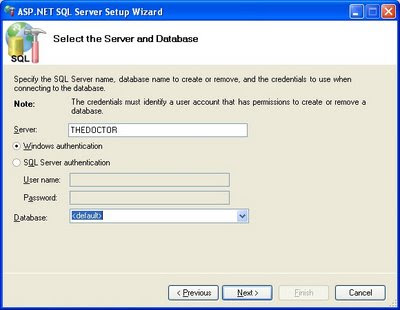
The Server is the Windows name of your computer, but WAIT, don't pop open that Database list or you'll get the dreaded...
Connection failed
Failed to query a list of database names from the SQL server. An error has occurred while establishing a connection to the server. When connecting to SQL Server 2005, this failure may be caused by the fact that under the default settings SQL Server does not allow remote connections. (provider: Named Pipes Provider, error: 40 - Could not open a connection to SQL Server)
...error.
This is not Microsoft's finest work, and this is where you must know the secret handshake I mentioned earlier. You must alter your Server Name to make this tool recognize that we're using SQLExpress. Add \SQLEXPRESS to the end of your computer name. Mine reads THEDOCTOR\SQLEXPRESS.  It also worked to use .\SQLEXPRESS.  Note also that if you named your SQL server something else when you installed it, you need to use that name.  The pop-down list will be enabled to open and there will be a list of all the databases on your machine.
Databases can be shared across machines too - in case your database isn't on the same machine that you develop on.

Select your new database and click Next.
Review and if all is well, click Next again.
Click Finish.

The database is ready for you to create membership and roles info. Now all we have to do is...

Tell web.config about the new database.

There are 3 steps for this.
  1. create a connection string.
  2. hook up the Membership provider.
  3. hook up the Roles Manager.
Here are the sections of my web.config that worked.

1. The Connection String

<connectionStrings>
<add name="MYDATABASE" connectionString="Data Source=THEDOCTOR\SQLEXPRESS;Initial Catalog=AFIDatabase;Integrated Security=True" providerName=".NET Framework Data Provider for SQL Server" />
</connectionStrings>
The bold text should be changed to reflect your database and server names. The name property (in green) will be needed to identify the connectionstring to the providers.

2. The Membership Provider

<membership defaultProvider="MyProvider" userIsOnlineTimeWindow="30">
<providers>
<clear/>
<add connectionStringName="MYDATABASE" applicationName="/" enablePasswordRetrieval="false" enablePasswordReset="true" requiresQuestionAndAnswer="true" requiresUniqueEmail="false" maxInvalidPasswordAttempts="5" minRequiredPasswordLength="4" minRequiredNonalphanumericCharacters="0" passwordAttemptWindow="10" passwordStrengthRegularExpression="" name="MyProvider" type="System.Web.Security.SqlMembershipProvider" />
</providers>
</membership>
The clear removes any references to the default databases from machine.config.
Note that the Membership object contains the definition of the provider which contains a reference to the connection string. The applicationName property is used to identify the application - you can share this name across many websites to allow a single signon for many sites.
So the membership object uses the MyProvider provider which uses the MyDatabase database.
( Membership object -> MyProvider -> MyDatabase )

3. the Roles Manager

<roleManager enabled="true" defaultProvider="MyProvider">
<providers>
<clear/>
<add connectionStringName="MYDATABASE" applicationName="/" name="MyProvider" type="System.Web.Security.SqlRoleProvider, System.Web, Version=2.0.0.0, Culture=neutral, PublicKeyToken=b03f5f7f11d50a3a" />
</providers>
</roleManager>
Note that even though I named the provider MyProvider again, it is in fact a different object. However, this allows me to use the Single Provider setting in the website settings page in Visual Web Developer.
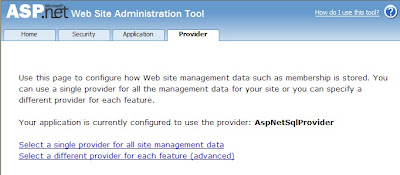
Now if you open the ASP.NET Configuration page from Visual Web Developer (Website - ASP.NET Configuration) and click the "Providers" tab, then the "Single Provider" option, you should see the new provider you just created, and it should already be connected.
If the configuration page crashes for any reason, there are a few things to try.
  • ensure that the names of your providers match the "defaultProvider" property exactly.
  • ensure that you have used the same applicationName everywhere.
  • ensure that the connectionStringName in your providers exactly match the name in your connectionStrings section.

For Further Reading

Many thanks to Rob Mills and Guru Bhai for their help figuring this out.

Tuesday, June 17, 2008

Using A Different Database as a Membership Provider in ASP.NET

There should be no need for me to ask this but after 2 days of ditzing around trying to make this work I am at the end of my patience. Linux is looking better all the time.

Ok, I created a website with security and it works great on my desktop, the performance sucks (utterly) on the test webserver, and I cannot use it at all on the production server. That's because we must use real MSSQL in production rather than a user instance, the production environment does not support user instances.

All I need is to tell my membership, role, and security objects, "Look over here, not over there". One would think that altering a connectionstring and replicating the membership tables would be all thats needed.

But NO.

Plus, I can't seem to find a comprehensive tutorial on this anywhere, so I'm mixing info from blogs and msdn and whatnot trying to make this work. Most of the tutorials out there are for MSSQL2000 (I'm using 2005) and a mix of ASP.NET 2.0 and 3.5 (Im using 3.5 - I think)

Here is what I want.

On my workstation, I want the authentication to look in my local MSSQL Express database for ALL security info.

In Production, I want the web server to look in the FULL MSSQL database for this info.

I do NOT NOT NOT want to re-engineer membership and roles objects.

Here's what I have found so far.

http://msdn.microsoft.com/en-us/library/sx3h274z.aspx - generic - no specifics

http://msdn.microsoft.com/en-us/library/6e9y4s5t.aspx - this adds my new database to the MEMBERSHIP selection but not the Single Provider or Role Provider

http://msdn.microsoft.com/en-us/library/2fx93s7w.aspx - This helps you create the table structure in your database, but leaves out 1 critical piece of info... the fact that I had to type "/sqlexpress" after the server name or it crashes when you try to drop down the list.

http://forums.asp.net/p/980214/2369556.aspx - This is where I found out you have to type "/sqlexpress"

http://msdn.microsoft.com/en-us/library/ms998317.aspx - not sure if "Forms Authentication" is what I'm doing or not...

Friday, June 6, 2008

Extreme Frustration with XML

Ok, given the following XML...
<?xml version="1.0" encoding="utf-8" ?>
<queries>
    <query name="MatchUser1">
        <sql>
            SELECT     st_abbr AS state, lic_number AS licensenumber, lname AS lastname, fname AS firstname, zip
            FROM         GovtRegistry
            WHERE     (st_abbr = @STATE) AND (lic_number = @LICENSE) AND (fname = @FIRSTNAME) AND (lname = @LASTNAME) AND (zip LIKE @ZIP)
        </sql>
    </query>
    <query name="MatchUser2">
        <sql>
            SELECT     st_abbr AS state, lic_number AS licensenumber, lname AS lastname, fname AS firstname, zip
            FROM         GovtRegistry
            WHERE     (st_abbr = @STATE) AND (lic_number = @LICENSE)
        </sql>
    </query>
</queries>

How do I do this?

  XmlDocument document = new XmlDocument();
  document.Load("SomeFile.XML");
  XmlNode myQuery=document.find("MatchUser1");

  //this should give the text from the "sql" field of MatchUser1.
  string SQL = myQuery["sql"].value;  

What am I missing here? All I can find online is how to manually walk from node to node, testing the types of the nodes. The whole point of XML used to be that it was simple to organize, store, and retrieve data!

Azeez wrote:
Hi Bryan,
I came across your  resume and was interested in speaking to you in regards to an 
opportunity with  one of my clients. Iam interested in reviewing your resume and 
having a  conversation to see if we can potentially work together. I would appreciate
if  you can send me a word version of your most updated resume and a number to reach 
you by during the day.

Job Title:     Web UI  Developer
Location:     Ann Arbor,  MI
Duration:     6 Months contract 2 hire
Job openings:
One opening for network programmer focusing on User  Interfaces (UI) for Network 
switches.
User interfaces include WEB UI, CLI,  and SNMP.
The applicant must have experience in embedded system WEB  UI.
The GateD user interface programmer must have a strong desire to work  with network 
protocols and user interfaces. 

Education Requirements are: 
Bachelors in Computer Science or  Computer Engineering with and 2-5 years of 
Experience, or Masters in Computers  Science and 1-3 years of experience.

Applicants for the job should have the following skills: 
Strong C  skills,
PERL, Python, TCL, Shell Scripting,
Experience with Apache Web  server
Be familiar with Cisco’s Command Line interface,
Strong skills in  operating systems and experience with embedded operating systems,
Have a  strong theoretical background in network software with 3+
upper classes in  networking, routing protocols,
Have strong background and experience in  creating user interfaces, 
Applicant should have a strong background  in: TCP/IP,  Routing protocols (RIP, 
RIPng, 
OSPF (v2/v3), BGP, IS-IS, PIM,  MSDP), Switching protocols (STP, RSTP, MSTP, 
802.1aq, TRILL), Wireless protocols  (802.11, military radios),
Strong background in 802.11 Wireless devices  (CAPWAP),
Experience writing Network Management protocols (SNMP, XML, Agent  X, SMUX, etc.),
Experience with Web servers (Apache),
Experience with the  Linux operating system,
Experience with embedded operating systems, 
Strong theoretical background in compilers and debugging tools, 
Experience with routers (cisco, juniper, 3com, extreme), and 10G switches  
(Force-10),
Experience with wireless controllers (Cisco, Trapeze),   and
Theoretical and practical experience creating network test  automation

Personal requirements:
The GateD project works in a high connected team  with multi-site development.
Individuals applying must be self-pace,  self-learning, and have experience working 
with teams.
Individuals must have  strong verbal skills with an ability to quickly come to 
resolution of  inter-personal and technical issues.

All groups with the GateD project operate on a team-approach.
The  project requires strong software discipline in software process (specification, 
 coding, and test).
The project is looking for team members who want to  advance their skill set and 
become industry leaders in routing.

Thanks & Regards,
Azeez Khan | Azeez@catamerica.com | Azeez.cat@gmail.com

Sr.Technical Recruiter | CAT Technology Inc.
"Committed to Human  Excellence Through IT"
Hasbrouck Heights, New Jersey. 

Office: (201) 255-0319 Ext : 279 | Fax: (201) 727-9296
www.catamerica.com

http://www.catamerica.com

Azeez: I have highlighted the skills I have in green, and those I lack in red. If you had really seen my info online, you would have already known this.

  Applicants for the job should have the following skills: 
 Strong C  skills,
 PERL, Python, TCL, Shell Scripting,
 Experience with Apache Web  server
 Be familiar with Cisco’s Command Line interface,
 Strong skills in operating systems and experience with embedded operating systems,
 Have a strong theoretical background in network software with 3+ upper classes in  networking, routing protocols,
 Have strong background and experience in  creating user interfaces, 
 Applicant should have a strong background  in: TCP/IP,  Routing protocols (RIP, RIPng, OSPF (v2/v3), BGP, IS-IS, PIM,  MSDP), Switching protocols (STP, RSTP, MSTP, 802.1aq, TRILL), Wireless protocols  (802.11, military radios),
 Strong background in 802.11 Wireless devices  (CAPWAP),
 Experience writing Network Management protocols (SNMP, XML, Agent  X, SMUX, etc.),
 Experience with Web servers (Apache),
 Experience with the  Linux operating system,
 Experience with embedded operating systems, 
 Strong theoretical background in compilers and debugging tools, 
 Experience with routers (cisco, juniper, 3com, extreme), and 10G switches  (Force-10),
 Experience with wireless controllers (Cisco, Trapeze),   and
 Theoretical and practical experience creating network test  automation

It's pretty obvious that what you did was not come across my resume, rather you harvested my email address and are blasting this out to 10,000 people hoping for a hit. If you did your job (for the money a broker gets, I expect this), you would not have bothered me with this. As it is, you just come across as lazy. I don't work for lazy agents.

Share This!

Contact Us

Name

Email *

Message *