It's like some Linux/Apache/Java coders with no GUI API were sitting around one day and suddenly thought, Hey, lets make Visual Studio web development more like working in Notepad!
Where there was once the simplicity of writing a query, presenting on a page, and handling edits - all trivially simple on WebForms there is now an arcane, 1950's mainframe style of coding.
There is now a Model (enterprise framework, that uses LINQ in C# but you can never be sure if it's the EF or the Database that is causing problems),
There is a View, which would be a web page but its basically an unreadable tag soup.
A Controller, which should consolidate all your validation, but they are not used that way, basically everyone creates a model, view, and controller for each page (and sometimes more model/view/controllers for elements within the page).
But here's the real fun part. You can't design visually anymore. Like the old days of designing HTML in Notepad (remember the days of having 6 files open in Notepad, and hopping back to the browser and refreshing 600 times a day?) MVC cannot use any of the ASP controls. So if you wanted to use a GridView, or an Image, you're screwed.
Today I needed to embed a code-generated image into a page. I created a class. The class works brilliantly to create a System.Drawing.Image. But then I went to present it, and I googled to a website that opened with "Warning, this is long but full of info. Read it all.". When I wanted to do this in WebForms, 1 google search and 30 minutes had it up and running.
This brings up the next thing. You just have to KNOW a million little things about MVC. With WebForms, I learned by trying stuff. With this, there are a million little secrets and NOTHING works until you find them. It's like those video games where you just can't find that damned twelfth key!
Of course MVC is all the rage this week, and everyone wants to say they used it so they can add it to their resume, but honest to God the sooner we can abandon this unholy mess the better!
I am sitting here actually considering signing up for a class in this crapfest... I have been intuiting software development since BASIC. I'm sure the LAMP programmers out there will like this more (not that any of them would seriously PAY for software), but for those of us who like to get things done, you know - THIS WEEK, this framework is a giant time-sucking pain in the ass!
...
Bryan Valencia is a contributing editor and founder of Visual Studio Journey. He owns and operates Software Services, a web design and hosting company in Manteca, California.
Monday, December 7, 2015


Wednesday, December 2, 2015
How to Convert a Bitmap to an Image
I have seen a lot of crap about how to do this, and there is some very bad advice out there.
This:
I did find a way to do this in one line of code. Many of the solutions I saw were 50+ lines of code, and most assumed you were saving the bitmap to a file first, which I did not want to do.
Bryan Valencia is a contributing editor and founder of Visual Studio Journey. He owns and operates Software Services, a web design and hosting company in Manteca, California.
This:
Image img = (Image)myBitmap;
DOES NOT WORK!I did find a way to do this in one line of code. Many of the solutions I saw were 50+ lines of code, and most assumed you were saving the bitmap to a file first, which I did not want to do.
Image img = Image.FromHbitmap(bmp.GetHbitmap());
...
Bryan Valencia is a contributing editor and founder of Visual Studio Journey. He owns and operates Software Services, a web design and hosting company in Manteca, California.
Wednesday, November 18, 2015
I Hate Technology
Lately the internet and technology in general seems like it was purposely designed by impish jawas to frustrate and anger me.
Like websites that use Javascript that only works on a 1982 version of a now defunct Linux browser. But I don't know that, all I see is a button that I can click 30 trillion times and NOTHING IS EVER EVER EVER GOING TO HAPPEN! That's an exaggeration, most of these websites are really reacting to my copious use of ad, popup, and tracker blockers. But dammit, if you're gonna show me a button, MAKE SURE ITS READY TO DO SOMETHING WHEN I CLICK IT!
I have a garage door clicker. Any guesses how often that works on one press?
My TOASTER has a secret button with unreadable white-on-chrome letters for when I smell smoke and I want to stop the FIRE. It will not simply pop up by lifting the lever like toasters have from the DAWN OF TIME.
My smoke alarm is great at telling me that the spot of pizza cheese on the bottom of the oven that has filled the house with smoke needs attention. After everyone is already opening windows.
My TV. Oh it's pretty. But it comes on in whatever mode it was left in, (TV, Video game) and is UNCONTROLLABLE for about 2 minutes while the software reboots. And how do I know it's done rebooting? Does it pop a nice little line of text? NO! I just have to start pressing remote buttons until it works.
Netflix...
Netflix...
Netflix,Netflix,Netflix,Netflix,Netflix,Netflix,Netflix,Netflix,Netflix,Netflix,Netflix,Netflix,Netflix,Netflix,Netflix,Netflix,Netflix,Netflix,Netflix,Netflix,Netflix,Netflix,Netflix,Netflix,Netflix,Netflix,Netflix,Netflix,Netflix,Netflix,Netflix,Netflix,Netflix,Netflix,Netflix.
|||
Service not available...
You know, I have always had a gas stove. Once when I was teaching my daughter to cook and use the stove safely, we put on a pot with some hot dogs. The fire was going, but the food didn't seem to be cooking fast enough for my daughter and she asked me if something could be wrong with it.
I began to think about it like I did with my old electric apartment piece of crap stove from my college days, which would regularly not work. But then I just looked at the flames under the pot and told my daughter. "It's fire. Man has been using fire for a long time now, it's pretty reliable."
My point is this. Don't be too proud of this technological wonder you've constructed. It's trying to make your head explode with anger. And that is the path to the dark side.
...
Bryan Valencia is a contributing editor and founder of Visual Studio Journey. He owns and operates Software Services, a web design and hosting company in Manteca, California.
Like websites that use Javascript that only works on a 1982 version of a now defunct Linux browser. But I don't know that, all I see is a button that I can click 30 trillion times and NOTHING IS EVER EVER EVER GOING TO HAPPEN! That's an exaggeration, most of these websites are really reacting to my copious use of ad, popup, and tracker blockers. But dammit, if you're gonna show me a button, MAKE SURE ITS READY TO DO SOMETHING WHEN I CLICK IT!
I have a garage door clicker. Any guesses how often that works on one press?
My TOASTER has a secret button with unreadable white-on-chrome letters for when I smell smoke and I want to stop the FIRE. It will not simply pop up by lifting the lever like toasters have from the DAWN OF TIME.
My smoke alarm is great at telling me that the spot of pizza cheese on the bottom of the oven that has filled the house with smoke needs attention. After everyone is already opening windows.
My TV. Oh it's pretty. But it comes on in whatever mode it was left in, (TV, Video game) and is UNCONTROLLABLE for about 2 minutes while the software reboots. And how do I know it's done rebooting? Does it pop a nice little line of text? NO! I just have to start pressing remote buttons until it works.
Netflix...
Netflix...
Netflix,Netflix,Netflix,Netflix,Netflix,Netflix,Netflix,Netflix,Netflix,Netflix,Netflix,Netflix,Netflix,Netflix,Netflix,Netflix,Netflix,Netflix,Netflix,Netflix,Netflix,Netflix,Netflix,Netflix,Netflix,Netflix,Netflix,Netflix,Netflix,Netflix,Netflix,Netflix,Netflix,Netflix,Netflix.
|||
Service not available...
You know, I have always had a gas stove. Once when I was teaching my daughter to cook and use the stove safely, we put on a pot with some hot dogs. The fire was going, but the food didn't seem to be cooking fast enough for my daughter and she asked me if something could be wrong with it.
I began to think about it like I did with my old electric apartment piece of crap stove from my college days, which would regularly not work. But then I just looked at the flames under the pot and told my daughter. "It's fire. Man has been using fire for a long time now, it's pretty reliable."
My point is this. Don't be too proud of this technological wonder you've constructed. It's trying to make your head explode with anger. And that is the path to the dark side.
...
Bryan Valencia is a contributing editor and founder of Visual Studio Journey. He owns and operates Software Services, a web design and hosting company in Manteca, California.
Tuesday, November 10, 2015
This application is currently offline. To enable the application, remove the app_offline.htm file from the application root directory.
This application is currently offline. To enable the application, remove the app_offline.htm file from the application root directory.I was getting this error in Visual Studio 2013 when trying to debug my app. There was no app_offline.htm file in my Solution Explorer, but if I did a Open folder in file explorer, there it was.
Just delete it.
...
Bryan Valencia is a contributing editor and founder of Visual Studio Journey. He owns and operates Software Services, a web design and hosting company in Manteca, California.
Wednesday, October 21, 2015
The Difference between Null and Empty String
There are a lot of posts out there telling you why one particular language or another treats null strings (or does not treat them) the same as an empty string.
Remember, conceptually a null is an unknown value. So let's say we have a middle name field, and two people in the table look like this:
Bob <null> Wilson
Theron <empty string> Shan
Bob's middle name is not known. He never provided it, we do not know if he has one or not. Theron, on the other hand HAS NO MIDDLE NAME. We know for a fact that we asked him, and he does not have one.
Likewise, with numbers, dates, guids. If you had a <null> number of widgets, that is different from 0 widgets. Again, <null> means unknown. 0 means zero.
So, queries.
Theron's middle name is clearly NOT Revinal. But we don't know that Bob's isn't (his middle name is unknown). This query would return Theron, but since null cannot be evaluated, we would not see Bob.
THIS IS HOW COUNTS GET OFF. If you made one list of names that are Revinal (0) and another that are not (1), you would conclude that there is one name in the database. This is because <null> does not satisfy either condition.
To write queries that treat nulls as empty strings, look up nvl (Oracle) and isNull (SQL Server).
So the next time someone tells you that a null is the same as an empty string, tell them they are full of an unknown number of prunes.
...
Bryan Valencia is a contributing editor and founder of Visual Studio Journey. He owns and operates Software Services, a web design and hosting company in Manteca, California.
Remember, conceptually a null is an unknown value. So let's say we have a middle name field, and two people in the table look like this:
Bob <null> Wilson
Theron <empty string> Shan
Bob's middle name is not known. He never provided it, we do not know if he has one or not. Theron, on the other hand HAS NO MIDDLE NAME. We know for a fact that we asked him, and he does not have one.
Likewise, with numbers, dates, guids. If you had a <null> number of widgets, that is different from 0 widgets. Again, <null> means unknown. 0 means zero.
So, queries.
select * from customers where middle_name <> "Revinal"
Theron's middle name is clearly NOT Revinal. But we don't know that Bob's isn't (his middle name is unknown). This query would return Theron, but since null cannot be evaluated, we would not see Bob.
select * from customers where middle_name = "Revinal"This would return neither Bob nor Theron. Theron's middle name is NOT Revinal, but we don't know if Bob's is or not.
THIS IS HOW COUNTS GET OFF. If you made one list of names that are Revinal (0) and another that are not (1), you would conclude that there is one name in the database. This is because <null> does not satisfy either condition.
To write queries that treat nulls as empty strings, look up nvl (Oracle) and isNull (SQL Server).
So the next time someone tells you that a null is the same as an empty string, tell them they are full of an unknown number of prunes.
...
Bryan Valencia is a contributing editor and founder of Visual Studio Journey. He owns and operates Software Services, a web design and hosting company in Manteca, California.
Friday, October 2, 2015
CSS: making a div x% - n pixels wide
I ran into this in a website today. I had a div that was 100% wide and I wanted it to be 100% - 15 pixels to align with another design element. Originally I was trying to look for a way to do something like width:100px - 15px, but that is just not a CSS standard. Then I thought of width:100%; margin-left:15px; margin-right:15px;. but that isnt right at all.
As it turns out, just nest two divs inside each other, and you have it made.
...
Bryan Valencia is a contributing editor and founder of Visual Studio Journey. He owns and operates Software Services, a web design and hosting company in Manteca, California.
As it turns out, just nest two divs inside each other, and you have it made.
<div style="width:100%; border: 1px solid black; text-align:center;">

This is a 100% wide box

</div>


<div style="width:100%;">

    <div style="margin-left: 15px; margin-right: 15px; border: 1px solid black; text-align:center;">

    This is a 100% wide box with a 15px margin

    </div>

</div>
This is a 100% wide box
This is a 100% wide box with margins...
Look how it overflows to the right!
there is no way in CSS to calculate 100%-30px to get this right. And the margins and padding actually GROW the box!
Look how it overflows to the right!
there is no way in CSS to calculate 100%-30px to get this right. And the margins and padding actually GROW the box!
This is a
style="margin-left: 15px; margin-right: 15px;"
div
inside a style="width: 100%;" div
inside a style="width: 100%;" div
...
Bryan Valencia is a contributing editor and founder of Visual Studio Journey. He owns and operates Software Services, a web design and hosting company in Manteca, California.
Monday, August 3, 2015
Select a List of Column Names in SQL Server
This gives a list of all the tables and columns in the tables in your database. The TABLES table was included to exclude views.
...
Bryan Valencia is a contributing editor and founder of Visual Studio Journey. He owns and operates Software Services, a web design and hosting company in Manteca, California.
Select
COLUMNS.TABLE_SCHEMA,
COLUMNS.TABLE_NAME,
COLUMNS.COLUMN_NAME
from INFORMATION_SCHEMA.COLUMNS
inner join
INFORMATION_SCHEMA.TABLES
on Tables.TABLE_CATALOG = Columns.TABLE_CATALOG
and Tables.TABLE_SCHEMA = Columns.TABLE_SCHEMA
and Tables.TABLE_NAME = COLUMNS.TABLE_NAME
and Tables.TABLE_TYPE = 'BASE TABLE'
...
Bryan Valencia is a contributing editor and founder of Visual Studio Journey. He owns and operates Software Services, a web design and hosting company in Manteca, California.
Sunday, June 1, 2014
Easy Linq Example
Linq is a great tool to introduce the power of SQL to the C# environment. I have found lots of uses for Linq, but this is just a quick sample to get you started.
 //Create a list of random integers
            List<int> myList = new List<int>();
            Random random = new Random();
            for (int i = 0; i < 1000; i++)
            {
                myList.Add(random.Next(0, 500));
            }

            //list is loaded
            //find the values > 10, eliminate dups, and sort.
            //now watch Linq in action

            List<int> filteredList = myList
                .Where<int>(r => r > 10)
                .Distinct()
                .OrderBy(r => (int)r).ToList();

            int fullList = myList.Count();
            int distinctList = filteredList.Count();

            //pop up the counts
            MessageBox.Show(string.Format("{0} records, {1} unique values.", fullList, distinctList));

            //pop up the list
            MessageBox.Show(string.Join(", ",filteredList.ToList()));


...
Bryan Valencia is a contributing editor and founder of Visual Studio Journey. He owns and operates Software Services, a web design and hosting company in Manteca, California.
Saturday, May 24, 2014
State
I have heard it a thousand times. Web pages are stateless. That means that - unlike desktop apps where you load a form with data and it stays loaded as long as the app is running - a web page loads. renders, and the webserver immediately forgets everything.
At least that's the way it was.
In the bad old days, web designers would put hidden fields on the form, and hide data there, sometimes raw data, and sometimes just a handle to session data being stored on the webserver, or in a database.
But these days, our frameworks have built-in storage for state information, and some components save their state data by default. Note the differences:
Create an HTML form (even in an ASP.NET site) and put this code in it.
This is the oldschool way of doing form posts. Note that if you click the submit button, the text you put in the text box will disappear. That's because it's state (value) is not being stored. Now create an asp.net form.
Note that this asp.net example remembers the values typed in its boxes on a postback. Now, in the browser, do a view page source.
Notice that there is a line in there that looks like this:
That's the automatic way ASP.NET stores state information on the web page. If you pick the textbox and look at its properties, you'll notice one called EnableViewstate and another called ViewstateMode. Saving state is enabled by default.
So this gets us to the two ways to store state information on an ASP.NET page.
Note the following:
Take care when using sessions. Note that the values are available to all pages on the site. For instance, let's say you put a SortedBy value in multiple pages. If the user travels from Customers sorted by LastName to the Orders page, the "SortedBy" key still says "LastName".
learn more
...
Bryan Valencia is a contributing editor and founder of Visual Studio Journey. He owns and operates Software Services, a web design and hosting company in Manteca, California.
At least that's the way it was.
In the bad old days, web designers would put hidden fields on the form, and hide data there, sometimes raw data, and sometimes just a handle to session data being stored on the webserver, or in a database.
But these days, our frameworks have built-in storage for state information, and some components save their state data by default. Note the differences:
Create an HTML form (even in an ASP.NET site) and put this code in it.
<!DOCTYPE html>
<html xmlns="http://www.w3.org/1999/xhtml">
<head>
    <title></title>
</head>
<body>
    <form id="thisform" action="HtmlPage.html" method="get">
        <input id="Text1" type="text" />
        <input id="Button1" type="submit" value="Post" />
    </form>
</body>
</html>
This is the oldschool way of doing form posts. Note that if you click the submit button, the text you put in the text box will disappear. That's because it's state (value) is not being stored. Now create an asp.net form.
<%@ Page Language="C#" AutoEventWireup="true" CodeFile="Default.aspx.cs" Inherits="_Default" %>

<!DOCTYPE html>

<html xmlns="http://www.w3.org/1999/xhtml">
<head runat="server">
    <title></title>
</head>
<body>
    <form id="form1" runat="server">
    <div>
            <asp:TextBox ID="TextBox1" runat="server"></asp:TextBox>
            <asp:Button ID="Button1" runat="server" Text="Button" />
    </div>
    </form>
</body>
</html>
Note that this asp.net example remembers the values typed in its boxes on a postback. Now, in the browser, do a view page source.
Notice that there is a line in there that looks like this:
<input type="hidden" name="__VIEWSTATE" id="__VIEWSTATE" value="E+wH9na5ksRkcpEtk56HJ50O8S2k8vu5dqruZeQtCdLxTdF9WHAcmxUsqAeaxzlLld9hLgv6LIwp+KFpLzzJEdyW2AOL2gz/b2NZ2SOhfx0=" />
That's the automatic way ASP.NET stores state information on the web page. If you pick the textbox and look at its properties, you'll notice one called EnableViewstate and another called ViewstateMode. Saving state is enabled by default.
So this gets us to the two ways to store state information on an ASP.NET page.
- Viewstate
- Session
ViewState
As discussed, viewstate stores the status of all viewstate-enabled controls. But you can also add stuff to Viewstate, and read it out again, even complex objects.
            //add a key
            ViewState.Add("myKey", "myValue");

            //store complex objects
            DataSet myData = new DataSet();
            ViewState.Add("data", myData);

            //change a key
            ViewState["myKey"] = "myNewValue";

            //read a key
            string data = (string)ViewState["myKey"];

            //delete a key
            ViewState.Remove("myKey");
            ViewState.Remove("data");
Note the following:
- ViewState lives in the page. It does not flow from page to page.
- Multiple users (like different computers and even 2 different browsers on the same computer do not share ViewState).
- ViewState is only read on a POSTBACK, not on an initial load of the page.
- I have found that storing things in ViewState can result in hard-to-debug errors that make your development life a living hell.
Session
Session is like ViewState, in that it is created automatically whether you want it or not. Session is linked to the user, not the page. When someone browses to your page and there is no session ID, a new session is created. Some features of sessions are:- Sessions time out after a period of inactivity.
- Session data persists for that user until the session times out
- Sessions can store complex items like ViewState
- Sessions are unique, not shared if more than one browser is opened
            //add a key
            Session.Add("myKey", "myValue");

            //store complex objects
            DataSet mySessionData = new DataSet();
            Session.Add("data", mySessionData);

            //change a key
            Session["myKey"] = "myNewValue";

            //read a key
            string data2 = (string)Session["myKey"];

            //delete a key
            Session.Remove("myKey");
            Session.Remove("data");

            //Special session methods
            Session.Abandon();
            Session.Clear();
            if (Session.IsNewSession) { }
            string s = Session.SessionID;
Take care when using sessions. Note that the values are available to all pages on the site. For instance, let's say you put a SortedBy value in multiple pages. If the user travels from Customers sorted by LastName to the Orders page, the "SortedBy" key still says "LastName".
learn more
...
Bryan Valencia is a contributing editor and founder of Visual Studio Journey. He owns and operates Software Services, a web design and hosting company in Manteca, California.
Thursday, January 9, 2014
Dramatically Speed Up Stored Procedures using Temp Tables
If you're wondering how to create a list, or temp table in a SQL Server Stored Procedure, look here.
But what if you're joining to an in-memory table and you experience performance issues? I had a multiple join against such a table, and found that the query was taking over 12 seconds to complete - causing a timeout ocassionally. Here was the temp table declaration:
...
Bryan Valencia is a contributing editor and founder of Visual Studio Journey. He owns and operates Software Services, a web design and hosting company in Manteca, California.
But what if you're joining to an in-memory table and you experience performance issues? I had a multiple join against such a table, and found that the query was taking over 12 seconds to complete - causing a timeout ocassionally. Here was the temp table declaration:
    declare @tempIDs TABLE
    (
        pick_list_id integer

    )
Simple enough, right? Just a long list of integers. But like I said the entire stored procedure was taking over 12 seconds to execute. In a database table, my first approach would be to make an index on the column. So that's what I did in my stored procedure. It turned out to be incredibly simple and improved performance from 12 seconds to 30 milliseconds. Looky!
    declare @tempIDs TABLE
    (
        pick_list_id integer not null PRIMARY KEY
    )
That's it! The rest of the stored procedure is exactly the same. That's a 40000% speed boost! Not bad for one modified line of code!...
Bryan Valencia is a contributing editor and founder of Visual Studio Journey. He owns and operates Software Services, a web design and hosting company in Manteca, California.
Tuesday, January 7, 2014
Column Modification Checklist
This is one of those things that I always forget part of, so because I just went through this, I thought I would document what needs to be done to sync your application whenever you modify any column in your database.
This tutorial is designed for:
There is actually a stored procedure for updating views. Once you have found a dependent view, just run...
That will take care of it. Of course if your view is no longer valid because of the change, you'll get an appropriately misleading error message from Microsoft.
Updating Stored Procs:
Your stored procs have a header much like this:
These header parameters and any internally declared variables must be changed to match any column changes.
...
Bryan Valencia is a contributing editor and founder of Visual Studio Journey. He owns and operates Software Services, a web design and hosting company in Manteca, California.
This tutorial is designed for:
- MS SQL Server
- Visual Studio (for web or desktop)
- In SQL Server Management Studio (SSMS)
- Check for source and destination columns (for instance if widening "Address1" from 40 to 50, make sure all the columns in the order table, address book, Shipping and Billing etc are all the same)
- Update All Views that depend on this column. (SQL Server does not do this automatically)
- Update all stored procedures that operate on this column (for instance in and out parameters that access the changed column)
- In your Desktop App:
- Check all dataset xsd files to ensure the result column maxlengths are updated.
- Check all dataset xsd files to ensure the query parameter maxlengths are updated.
- Ensure all databound textboxes are set to the correct MaxLength.
- Ensure all DataGridView Columns are set to the correct MaxInputLength.
There is actually a stored procedure for updating views. Once you have found a dependent view, just run...
EXECUTE sp_refreshview 'dbo.v_myViewName';
That will take care of it. Of course if your view is no longer valid because of the change, you'll get an appropriately misleading error message from Microsoft.
Updating Stored Procs:
Your stored procs have a header much like this:
ALTER PROCEDURE [dbo].[StoredProcName]
    -- Add the parameters for the stored procedure here
    @customer varchar(10),
    @PurchaseOrder varchar(15),
    @Address1 varchar(40)
AS
These header parameters and any internally declared variables must be changed to match any column changes.
...
Bryan Valencia is a contributing editor and founder of Visual Studio Journey. He owns and operates Software Services, a web design and hosting company in Manteca, California.
Thursday, January 2, 2014
How to access your Main Form from a Static Method
Of course the right way is to pass a handle to the form if it is needed in the static method.
...
Bryan Valencia is a contributing editor and founder of Visual Studio Journey. He owns and operates Software Services, a web design and hosting company in Manteca, California.
public static void Import(MainForm parent)

{

    parent.whatever();

}
But in my case I just didn't want to pass that handle around - and my application only had one form, so...
Application.OpenForms[0].Refresh();
...
Bryan Valencia is a contributing editor and founder of Visual Studio Journey. He owns and operates Software Services, a web design and hosting company in Manteca, California.
Friday, December 27, 2013
Windows 8 is Costing You Money
 |
| Your Money is Being Sucked Down a Hole |
This function of the DataGridView has been spotty at best even on the other versions of Windows, and I have had to code around problems with it before. Basically, the thing is just a nightmare to configure and use. I constantly find myself writing 200 lines of code to get the damn thing to stop crashing, when in my humble opinion, the damned thing ought to just work out of the box. Now, I can see there might be problems if I were trying to shoehorn grids into grids, or streaming media into 20,000 rows of data... but really I am doing nothing out of the ordinary here.
Now I have to stop ongoing development, and retrofit this whole app (at the client's expense) to an operating system that - say it with me - ought to just work out of the box!
Meanwhile the client is wondering if I am really all that sharp, because Microsoft muffed up their OS with backward compatibility problems. Thanks, Microsoft!
...
Bryan Valencia is a contributing editor and founder of Visual Studio Journey. He owns and operates Software Services, a web design and hosting company in Manteca, California.
Monday, December 16, 2013
Refresh All Views on SQL Server
Whenever you make a change to a table - say, to modify a column - you need to update all the views that depend on that column. This script will find and update all your views.
Of course if a view is now no longer correct, you'll see on your messages tab in SQL Server Management Studio.
...
Bryan Valencia is a contributing editor and founder of Visual Studio Journey. He owns and operates Software Services, a web design and hosting company in Manteca, California.
-- Back Up All Databases
-- by Bryan Valencia

--create temp table
declare @temp table(commands varchar(500), completed bit)

--load it with backup commands
insert into @temp (commands, completed)
(
    SELECT DISTINCT 'EXEC sp_refreshview ''' + name + '''',0
    FROM sys.objects AS so
    INNER JOIN sys.sql_expression_dependencies AS sed
        ON so.object_id = sed.referencing_id
    WHERE so.type = 'V'
    and is_schema_bound_reference = 0
)

--variable for the current command
declare @thisCommand varchar(500);

--loop through the table
while (select count(1) from @temp where completed=0)>0
begin
    --find the first row that has not already been executed
    select top 1 @thisCommand = commands from @temp where completed=0

    --show the command in the "mesage" output window.
    print @thisCommand

    --execute the command
    EXEC (@thisCommand);

    --flag this row as completed.
    update @temp set completed=1 where commands=@thisCommand
end

--show the user the rows that have been found.
select * from @temp
Of course if a view is now no longer correct, you'll see on your messages tab in SQL Server Management Studio.
...
Bryan Valencia is a contributing editor and founder of Visual Studio Journey. He owns and operates Software Services, a web design and hosting company in Manteca, California.
Friday, December 13, 2013
Integratederatederatedratedrated
This is not about Visual Studio. In fact it's from 1982 when I was in tech school in Phoenix, Arizona. We were using a Radio Shack Model 100 computer with 4K of RAM and a blazing fast cassette drive to store our programs. Marc was using BASIC to create a simple keyboard-to-printer program so that he could type a page of text, edit, and print the text on the Epson dot matrix printer.
Basically he created an array to hold all the characters typed, and used that array to draw the text onscreen AND to print it when he was done.
There was one small thing though.
The backspace character was a character like any other in the array, it (correctly) backed the cursor up on the screen, but did absolutely nothing to the printer. So Marc was typing a paper about integrated circuits, and his edits - which looked fine onscreen, printed out as Integratederatederatedratedrated Circuits.
The moral of this story is: There's always more to a program than you thought up front.
...
Bryan Valencia is a contributing editor and founder of Visual Studio Journey. He owns and operates Software Services, a web design and hosting company in Manteca, California.
Basically he created an array to hold all the characters typed, and used that array to draw the text onscreen AND to print it when he was done.
There was one small thing though.
The backspace character was a character like any other in the array, it (correctly) backed the cursor up on the screen, but did absolutely nothing to the printer. So Marc was typing a paper about integrated circuits, and his edits - which looked fine onscreen, printed out as Integratederatederatedratedrated Circuits.
The moral of this story is: There's always more to a program than you thought up front.
...
Bryan Valencia is a contributing editor and founder of Visual Studio Journey. He owns and operates Software Services, a web design and hosting company in Manteca, California.
Thursday, December 5, 2013
Selecting scalar values from a stored procedure
The easy and obvious answer is to use a function, not a procedure. Then you can use it like any built-in T-SQL function.
In a moment of brilliant engineering, SQL Server does not allow the return value of a stored procedure to appear as a column in a query (select, insert, update, where clause), so you can't just say...
...
Bryan Valencia is a contributing editor and founder of Visual Studio Journey. He owns and operates Software Services, a web design and hosting company in Manteca, California.
select 1, dbo.Function()
But alas, functions do not allow us to store (insert, update, delete) any data to the database and my stored procedure needs to do exactly that. In a moment of brilliant engineering, SQL Server does not allow the return value of a stored procedure to appear as a column in a query (select, insert, update, where clause), so you can't just say...
select orderID, dbo.StoredProcedure() from...
In my task, I had to insert the results of a stored procedure into a column in a table. The code example I show below creates a temporary lookup table, and uses it later for a list of inserts. try to follow this...
--creates a temp table for later use in joining (not shown)
declare @PickListNo table(OrderID varchar(20), PickListNo int, done bit);

--loads the temp table, except the column from the stored procedure
insert into @PickListNo (OrderID, done)
(
    Select distinct AOO.[order number], 0 from uploads.open_orders AOO
)

--vars the stored procedure needs
declare @A int
declare @NextVal int

--while there are unprocessed rows...
while exists (select 1 from @PickListNo where PickListNo is null)
BEGIN
    --execute the procedure and capture the return value
    exec @A=dbo.NextPickListNo @NextVal OUTPUT

    --update one row in the table
    --I used Max(ID) to find a single row, but I might have used MIN, or Select top 1 as well.
    update @PickListNo set PicklistNo = @A where OrderID=(select MAX(orderID) from @PickListNo where PickListNo is null)
END
This use of the while loop is my way of cheating and not using cursors. Cursors are nicely powerful but demand a lot of babysitting and resources (so I am told)....
Bryan Valencia is a contributing editor and founder of Visual Studio Journey. He owns and operates Software Services, a web design and hosting company in Manteca, California.
Tuesday, December 3, 2013
Conditional Output with the ? Operator in C#
I needed to ensure that column data was trimmed to the correct lengths in a SQL insert. Normally I would expect that this code...
...would do the trick.
Sadly, if you use substring with a length greater than your string, you don't get the whole string as you might expect, you get this.
This works, and so does this...
But there is also this:
So I have written a clip() function that acts the way I expected substring() to:
...
Bryan Valencia is a contributing editor and founder of Visual Studio Journey. He owns and operates Software Services, a web design and hosting company in Manteca, California.
string toobig="This string is exactly 37 characters.";

string nottoobig = "13 characters";


//attempt to trim both to 20


string s;

s = toobig.Substring(0, 20);

Console.WriteLine(s);


s = nottoobig.Substring(0, 20);

Console.WriteLine(s);
...would do the trick.
Sadly, if you use substring with a length greater than your string, you don't get the whole string as you might expect, you get this.
System.ArgumentOutOfRangeException was unhandled
  Message=Index and length must refer to a location within the string.
Parameter name: length
  Source=mscorlib
  ParamName=length
So we need a way to trim a string only if it's needed, i.e. a conditional trim. Normally this is written like this:
if (nottoobig.Length > 20) { s = nottoobig.Substring(0, 20); } else { s = nottoobig; };
This works, and so does this...
s = nottoobig.Substring(0, Math.Min(20, nottoobig.Length));
where we substring to the min of the actual length and the desired length.But there is also this:
s = nottoobig.Length > 20 ? nottoobig.Substring(0, 20) : nottoobig;
This works just like excel iif():
condition ? first_expression : second_expression;
Condition must be true or false. If true, the first_expression is used, if false, the second_expression is.
So I have written a clip() function that acts the way I expected substring() to:
        static void Main(string[] args)
        {
            string toobig = "This string is exactly 37 characters.";
            string nottoobig = "13 characters";

            //attempt to trim both to 20
            string s;
            s = clip(toobig,20);
            Console.WriteLine(s);

            s = clip(nottoobig, 20);
            Console.WriteLine(s);
        }

        private static string clip(string s, int max)
        {
            if (max < 0) max = 0;
            return s.Length > max ? s.Substring(0, max) : s;
        }
...
Bryan Valencia is a contributing editor and founder of Visual Studio Journey. He owns and operates Software Services, a web design and hosting company in Manteca, California.
Wednesday, November 13, 2013
The type or namespace name 'OfficeOpenXml' could not be found
Error Message:
The type or namespace name 'OfficeOpenXml' could not be found (are you missing a using directive or an assembly reference?)
You need to change your app config to use .NET Framework 4 not .NET Framework 4 (Client Profile).
Project - <Project> Properties - Application tab
Target Framework
As it turns out, EPPlus needs the System.Web namespace, which is not in the client profile.
...
Bryan Valencia is a contributing editor and founder of Visual Studio Journey. He owns and operates Software Services, a web design and hosting company in Manteca, California.
The type or namespace name 'OfficeOpenXml' could not be found (are you missing a using directive or an assembly reference?)
You need to change your app config to use .NET Framework 4 not .NET Framework 4 (Client Profile).
Project - <Project> Properties - Application tab
Target Framework
As it turns out, EPPlus needs the System.Web namespace, which is not in the client profile.
...
Bryan Valencia is a contributing editor and founder of Visual Studio Journey. He owns and operates Software Services, a web design and hosting company in Manteca, California.
Thursday, October 31, 2013
Auto Close and why you want it OFF
All night.
Every 2 seconds.
It turns out that the reason for this is that the database is set to automatically shut down whenever there are no more connections. In a web environment, that means every single time there is a page hit.
We need to turn this off. Now.
Open SQL Server Management Studio and log in.
From the Object Explorer select
- Server
- Databases
- DatabaseName → Properties
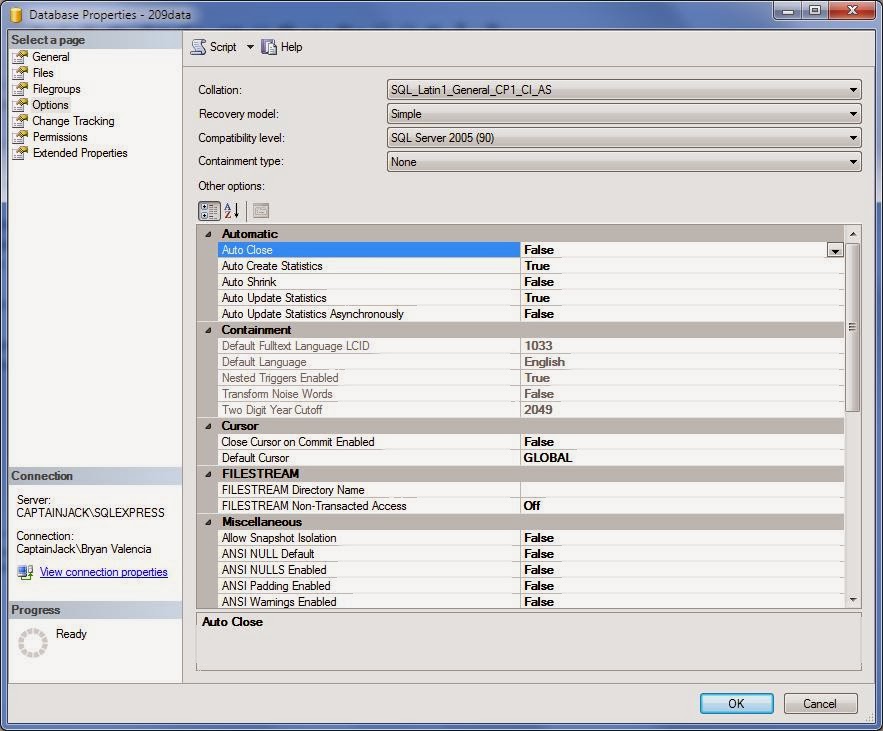
...
Bryan Valencia is a contributing editor and founder of Visual Studio Journey. He owns and operates Software Services, a web design and hosting company in Manteca, California.
Monday, September 2, 2013
Labor Day
Isn't it great to live in a country where we can celebrate Labor by taking the day off work?
Subscribe to:
Posts (Atom)